
![]() |
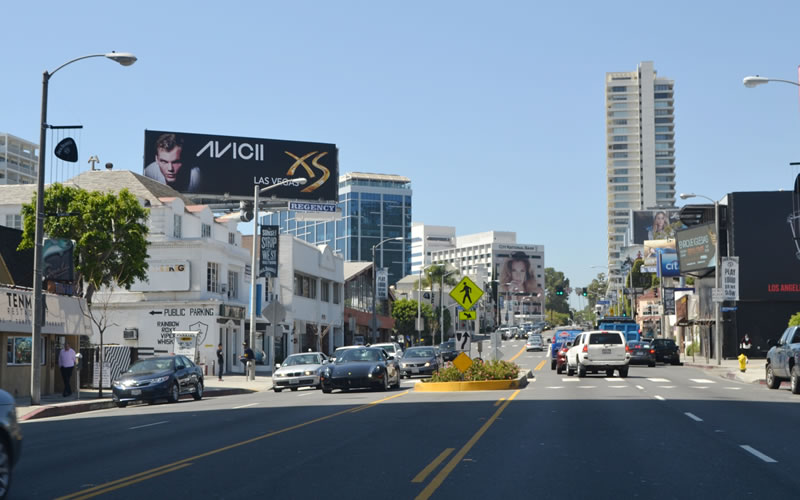
Static Bulletins are the largest standard-sized form of outdoor advertising located on highly visible expressways and primary arteries. Permanent Boards remain at the same location for the contract term; Rotary Boards are moved every 60-90 days to refresh your audience. Copy area for Bulletins range from 12 x 25 feet to 20 x 60 feet, and is digitally reproduced on heavy vinyl to withstand weather conditions. |
|
![]() |
|
Overall Size: 15'-4" x 49'-4" / Hemmed Size, Includes Pockets Final Size: Pockets (4" all around)...15'-4" x 49'-4" Bleed (4" all around)...14'-8" x 48'-8" Visual Area...14' x 48' Artwork Size: Scale...1/4" = 1' Bleed...3.75" x 12.25" Visual Area...3.5" x 12" Critical Area...1/8" within Visual Area Resolution...500dpi (300dpi min.) |
Extensions: *Extensions are an additional square footage cost Actual Size: Max on Top...5'-6" Left or Right Max...2' Extension Bottom Limit...1' Artwork Size: Max on Top...1.375" Left or Right Max...0.5" Bottom Limit...0.25" |
Digital File Requirements: Correct preparation of digital files is critical for timely production of your product. YOU MUST SEND A PREVIEWFILE WITH EVERY JOB- LOW RES. PDF or JPEG FORMAT. CMYK: All Images Resolution: 500dpi (300dpi min.) at "artwork size" Photoshop: Flattened TIF or PSD files only- do not send jpegs or layered files Illustrator: EPS Format- Outline ALL fonts prior to sending Quark or InDesign: Make sure to include all fonts and images PDF/Jpegs: Do not send for final output- use for previewing purposes only |
|
|
|
Overall Size: 21'-4" x 61'-4" / Hemmed Size, Includes Pockets Final Size: Pockets (4" all around)...21'-4" x 61'-4" Bleed (4" all around)...20'-8" x 60'-8" Visual Area...20' x 60' Artwork Size: Scale...1/4" = 1' Bleed...5.25" x 15.25" Visual Area...5" x 15" Critical Area...1/8" within Visual Area Resolution...500dpi (300dpi min.) |
Extensions: *Extensions are an additional square footage cost Actual Size: Max on Top...5'-6" Left or Right Max...2' Extension Bottom Limit...1' Artwork Size: Max on Top...1.375" Left or Right Max...0.5" Bottom Limit...0.25" |
Digital File Requirements: Correct preparation of digital files is critical for timely production of your product. YOU MUST SEND A PREVIEWFILE WITH EVERY JOB- LOW RES. PDF or JPEG FORMAT. CMYK: All Images Resolution: 500dpi (300dpi min.) at "artwork size" Photoshop: Flattened TIF or PSD files only- do not send jpegs or layered files Illustrator: EPS Format- Outline ALL fonts prior to sending Quark or InDesign: Make sure to include all fonts and images PDF/Jpegs: Do not send for final output- use for previewing purposes only |
|
|
|
Overall Size: 11'-10" x 37'-4" / Hemmed Size, Includes Pockets Final Size: Pockets (4" all around)...11'-10" x 37'-4" Bleed (4" all around)...11'-2" x 36'-8" Visual Area..10'-6" x 36' Artwork Size: Scale...1/4" = 1' Bleed...2.875" x 9.25" Visual Area...2.625" x 9" Critical Area...1/8" within Visual Area Resolution...500dpi (300dpi min.) |
Extensions: *Extensions are an additional square footage cost Actual Size: Max on Top...5'-6" Left or Right Max...2' Extension Bottom Limit...1' Artwork Size: Max on Top...1.375" Left or Right Max...0.5" Bottom Limit...0.25" |
Digital File Requirements: Correct preparation of digital files is critical for timely production of your product. YOU MUST SEND A PREVIEWFILE WITH EVERY JOB- LOW RES. PDF or JPEG FORMAT. CMYK: All Images Resolution: 500dpi (300dpi min.) at "artwork size" Photoshop: Flattened TIF or PSD files only- do not send jpegs or layered files Illustrator: EPS Format- Outline ALL fonts prior to sending Quark or InDesign: Make sure to include all fonts and images PDF/Jpegs: Do not send for final output- use for previewing purposes only |
|
![]() |
|
Digital File Requirements: Correct preparation of digital files is critical for timely production of your product. YOU MUST SEND A PREVIEWFILE WITH EVERY JOB- LOW RES. PDF or JPEG FORMAT. CMYK: All Images Resolution: 500dpi (300dpi min.) at "artwork size" Photoshop: Flattened TIF or PSD files only- do not send jpegs or layered files Illustrator: EPS Format- Outline ALL fonts prior to s ending Quark or InDesign: Make sure to include all fonts and images PDF/Jpegs: Do not send for final output- use for previewing purposes only |
|